

Why Your Home Office Setup Matters More Than Ever
A home office setup is more than just a desk and chair—it's your foundation for productivity, comfort, and work-life balance. Here's what you need to create an effective workspace:
Essential Components of a Home Office Setup:
- Ergonomic Foundation - Adjustable desk and supportive chair
- Technology Setup - Monitor(s), keyboard, mouse, and phone management
- Organization Systems - Storage solutions and cable management
- Optimized Environment - Proper lighting, plants, and noise control
- Clear Boundaries - Dedicated space separate from personal areas
Since 2019, the number of people working from home has jumped by 47%. That shift has made one thing crystal clear: where you work matters just as much as how you work.
The average home office setup costs around $1,500, but you don't need to spend that much to be productive. What you do need is a workspace that supports your body, manages your devices efficiently, and helps you focus.
62% of workers report being more productive at home—but only when their setup is right. A comfortable chair prevents back pain. Good lighting reduces eye strain. And smart organization, like a dedicated desk mount for your work and personal phones, keeps you from missing important calls or messages while juggling multiple devices.
This guide walks you through building a home office that works for your space, budget, and workstyle. Whether you're setting up in a spare bedroom or carving out a corner in your living room, these essentials will help you create a clean, efficient workspace where you can do your best work.
Building Your Ergonomic Foundation: Desks, Chairs, and Storage

Your physical comfort and long-term health are paramount in a home office setup, where you spend a significant portion of your day. Investing in the right desk, chair, and smart storage forms the ergonomic bedrock of a productive environment.
Choosing the Right Desk for Your Space and Health
The desk is the central hub of your home office setup. The right one balances your space, work needs, and well-being. While there's no one-size-fits-all solution, there is a right fit for you.
Sitting for an average of 8 hours a day can cause health problems. A standing desk or desk converter can help, with benefits like reducing back pain by up to 54% and improving circulation. Alternating between sitting and standing introduces more movement into your day, which is crucial for health and focus. Look for adjustable desks with programmable height settings for ease of use.
If a full standing desk isn't in your budget or you have limited space, a desk converter is an excellent alternative. These devices sit on top of your existing desk and lift your monitors and keyboard, letting you stand for portions of your workday without needing a new desk entirely. They are a budget-friendly option that still delivers many of the ergonomic benefits.
An L-shaped desk offers ample surface area for those with more space, allowing you to spread out or use multiple monitors. They also provide a clear separation between work zones. For tighter budgets, options like the Soreno L-Shaped Budget corner desk offer a functional solution without breaking the bank.
When choosing a desk, consider its size relative to your room, its adjustability for ergonomic posture, and its material for durability and aesthetics. A desk is an essential component of your home office setup that directly impacts your comfort and productivity. To dive deeper into the health implications of prolonged sitting, check out Benefits of not sitting all day.
The Ergonomic Chair: Your Most Important Investment
If your desk is the hub, your chair is the throne. Ergonomic chairs are the most important piece of home office furniture; 85% of workers find them essential for comfort and productivity. A good ergonomic chair supports your spine's natural curves, promoting healthy posture and preventing aches and pains that derail focus.
When choosing an ergonomic chair for your home office setup, look for key features such as:
- Adjustable Height: Your feet should be flat on the floor, and your knees at a 90-degree angle.
- Lumbar Support: A good chair will have adjustable lumbar support to match the curve of your lower back.
- Adjustable Armrests: These help support your arms and shoulders, reducing strain.
- Seat Depth and Tilt: The seat should be deep enough to support your thighs, with a gap between the edge and the back of your knees, and allow for tilting.
- Breathable Material: Especially for long hours, breathable mesh or fabric can prevent discomfort.
While high-end ergonomic chairs, like the renowned Herman Miller Aeron High-end chair, can cost upwards of $1,000, there are many excellent budget-friendly options available around the $250 mark that still offer significant ergonomic benefits. Given that 74% of workers say a comfortable home office setup is essential for their productivity, this is an area where we strongly advise against cutting corners. Your body will thank you!
Smart Storage Solutions for a Clutter-Free Office
A clean desk means a clear mind, and smart storage is the secret weapon against clutter in any home office setup. The goal is not just to hide things away, but to organize them in a way that supports your workflow and makes it easy to switch between work and personal life.
Consider a mix of solutions:
- Filing Cabinets: Essential for physical documents, they can be compact or mobile to tuck away when not in use.
- Shelving: Floating shelves or modular units are fantastic for utilizing vertical space, especially in smaller offices. They keep items accessible without taking up precious desk real estate.
- Desk Organizers: Trays, pen holders, and small bins keep everyday items tidy and within reach.
- Drawer Units: These offer discreet storage for items you don't need constantly visible.
Effective storage isn't just about aesthetics; it's about efficiency. When your workspace is organized, you spend less time searching for items and more time focused on tasks. This also helps in creating a dedicated space that can be "put away" at the end of the workday, helping us maintain healthy work-life boundaries. For more insights on keeping your digital and physical workspace streamlined, explore More info about productivity device management.
The Ultimate Tech Guide for Your Home Office Setup

In today's remote work landscape, technology is the engine of our home office setup. From the screens we stare at to the peripherals we interact with, every piece plays a role in our efficiency and comfort. Let's explore optimizing your tech arsenal for peak performance.
Maximizing Screen Real Estate: Monitor Setups for Productivity
One of the quickest ways to boost productivity in your home office setup is by expanding your screen real estate. Whether you're a multitasker juggling multiple applications or a creative professional needing a broad canvas, the right monitor setup can make a world of difference.
Dual monitors are a classic choice for a reason. They allow you to run more applications at once, eliminating the need for constant "mousing between tabs and programs." You can have your main work application on one screen and reference materials, email, or communication tools on the other. For optimal ergonomics, position your primary monitor directly in front of you, with the top of the screen at eye level and an arm's length away. The second monitor can be placed beside it, angled slightly towards you.
Ultrawide monitors offer a seamless, expansive view, perfect for editing large spreadsheets, video timelines, or graphic design projects. They effectively combine the space of two monitors into one, often with a gentle curve for an immersive experience.
A growing trend is incorporating a vertical monitor alongside an ultrawide or standard display. This setup is particularly useful for tasks involving long documents, coding, or social media feeds, as it minimizes scrolling. The unique 16:18 aspect ratio of the LG DualUp 28-Inch 2K Vertical Monitor for $697 is a great example, allowing you to view more content without horizontal scrolling, making tasks like checking Gmail much more efficient.
For those who work from different locations, portable monitors are game-changers. They offer the advantage of a second screen on the go, boosting productivity in coffee shops, hotels, or even just another room in your house. These lightweight, USB-C powered displays provide much-needed screen real estate for remote work without the bulk of a traditional monitor.
Finally, consider monitor arms. These lift your screens, freeing up valuable desk space and allowing for precise ergonomic positioning. They are a must-have for a clean and efficient home office setup.
Must-Have Accessories for a Modern Home Office Setup
Beyond the big-ticket items, a suite of carefully chosen accessories can dramatically improve your home office setup, making it both more functional and enjoyable.
Here's our list of essential accessories:
- Ergonomic Keyboard: Choose between mechanical keyboards for tactile feedback or low-profile options for comfort. Look for wireless models to reduce cable clutter.
- High-Precision Mouse: A wireless mouse with adjustable DPI and extra buttons can streamline workflows. Some models even feature quiet clicks, a wonderful boon if you're frequently working around others. For spreadsheet warriors, dual scroll wheels can be a game-changer.
- 1080p Webcam: While laptop webcams often produce "potato quality" video, a dedicated 1080p (or even 4K) webcam will significantly improve your presence in video calls.
- USB-C Hub/Docking Station: If you're connecting a laptop to multiple peripherals, a multi-port hub or docking station is indispensable. It consolidates all your connections (monitors, keyboard, mouse, power) into a single plug for your laptop, streamlining your setup.
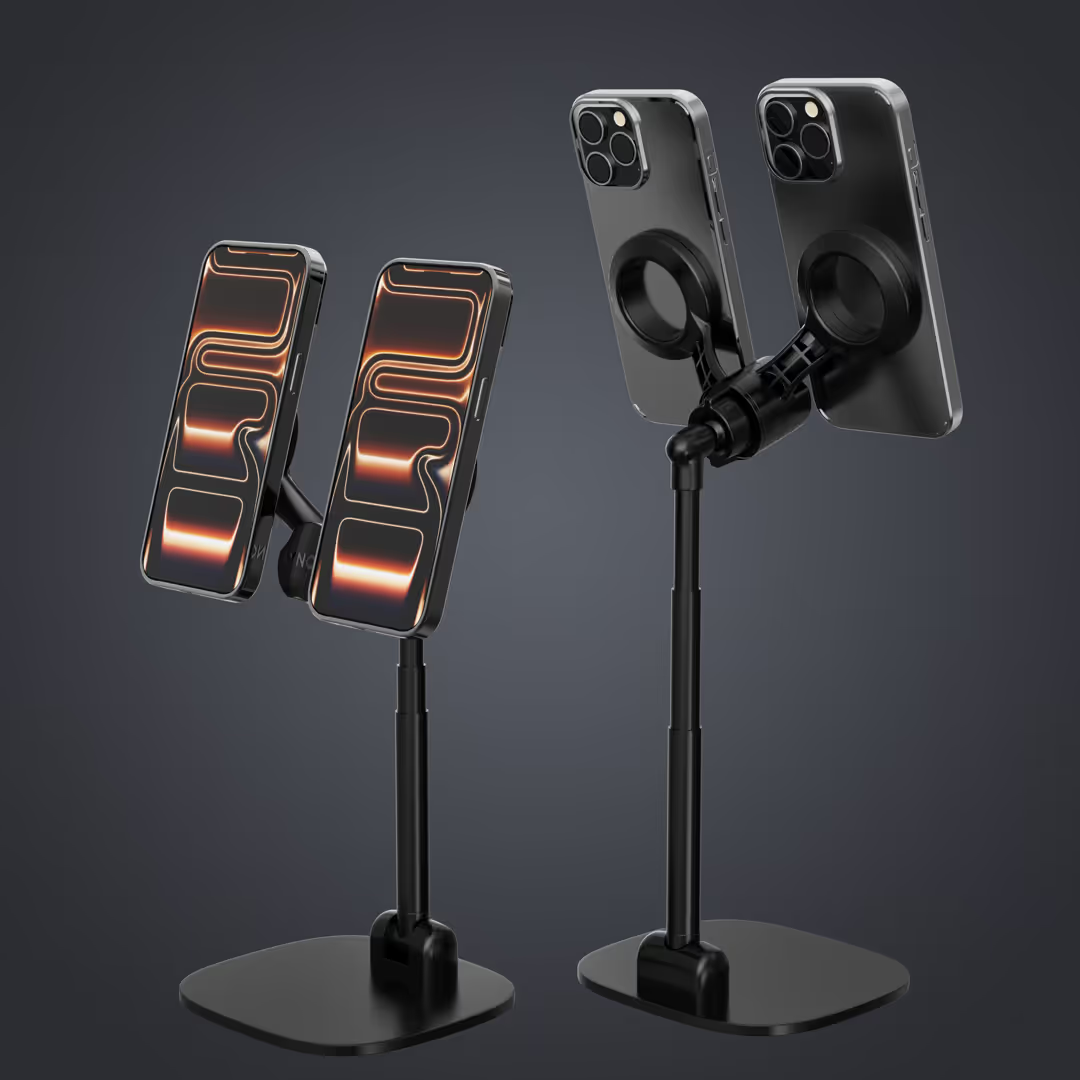
- Dual Phone Mount: In our increasingly connected world, many of us juggle both a personal and a work phone. This can lead to missed notifications or a cluttered desk. A dual phone mount, such as the Lynqq Desktop Mount, is a must-have for anyone managing two devices. It enables effortless management of both phones simultaneously, keeping them visible, charged, and organized. This simple addition boosts productivity by ensuring you never miss an important call or message, whether it's for your personal life or your professional one. We've found that a dedicated mount helps in Managing a Personal and Work Phone and you can learn more with A guide to using a 2 cell phone holder.
These accessories might seem small, but their collective impact on your daily workflow and comfort is immense. They embody the latest trends in modern home office design, prioritizing efficiency, ergonomics, and seamless connectivity.
Accommodating Different Workstyles
A truly effective home office setup is one that adapts to your unique workstyle. We know that a creative's needs differ vastly from a tech engineer's or a writer's. Let's explore how to tailor your space:
- Creative Setups: For artists, designers, or anyone requiring visual inspiration, your space should be vibrant and flexible. Ample desk space for sketching or using a drawing tablet is key. Consider a large monitor for detailed work and perhaps a secondary vertical monitor for reference images. Incorporate elements that spark joy—a gallery wall, unique lighting, or colorful accessories. Easy-access storage for tools and materials is also crucial.
- Tech-Heavy Setups: Software engineers, data analysts, and IT professionals often thrive with multiple monitors (including ultrawide or vertical options) to display code, data, and documentation simultaneously. A powerful desktop PC or a high-performance laptop connected to a docking station is standard. Prioritize robust cable management to keep the intricate web of wires tidy. High-quality ergonomic keyboards and mice are essential for long hours of precise input.
- Writing-Focused Setups: Authors, copywriters, and content creators typically benefit from a minimalist, distraction-free environment. A comfortable, ergonomic chair and a solid desk are paramount. While a single monitor might suffice, a second screen for research can be invaluable. Focus on clear desk space, good lighting, and perhaps a comfortable reading nook nearby for breaks. Noise-canceling headphones are a writer's best friend.
Regardless of your profession, the core idea is to create a space that empowers your specific tasks and minimizes friction. By understanding your daily routines and requirements, we can build a home office setup that feels less like a workspace and more like an extension of your professional self. To see how our solutions cater to various remote professionals, check out Learn more about our solutions for remote professionals.
Optimizing Your Environment for Focus and Inspiration
Once we've got the foundational elements and tech in place, it's time to fine-tune the environment. A truly inspiring and productive home office setup goes beyond just furniture and gadgets; it considers the subtle influences of light, sound, and organization.
Taming the Cable Monster: Organization and Management
Ah, the cable monster! It lurks under our desks, behind our monitors, and threatens to turn even the most pristine home office setup into a tangled mess. But fear not, taming this beast is entirely achievable, and it dramatically improves both aesthetics and safety.
Effective cable management helps improve organization in a home office by:
- Reducing Clutter: Fewer visible wires mean a cleaner, more minimalist look, which can reduce visual distractions.
- Preventing Hazards: Tangled cables are tripping hazards and can be dangerous for pets.
- Improving Airflow: Bundled cables can restrict airflow around electronics, leading to overheating.
- Simplifying Maintenance: When cables are organized, it's much easier to identify and troubleshoot connections.
Tools to help you win the battle:
- Cable Sleeves and Wraps: These bundle multiple cables together into a single, neat tube.
- Under-Desk Cable Trays: These trays attach to the underside of your desk, holding power strips and excess cable slack out of sight.
- Cable Clips and Ties: Use these to route individual cables along desk legs or walls, keeping them secure and out of the way.
- Wireless Accessories: Where possible, opt for wireless keyboards, mice, and headphones to eliminate cables entirely.
- Power Strips with Thoughtful Design: Consider power strips with rotating outlets to accommodate bulky chargers without blocking adjacent sockets. A robust surge protector is also essential to protect your valuable electronics from power fluctuations. We recommend options like the Smartish Cable Wrangler for $30.
A little effort in cable management goes a long way in creating a truly clean and efficient home office setup.
Let There Be Light: Effective Home Office Lighting
Good lighting is not just about visibility; it profoundly impacts our mood, energy levels, and eye health. In fact, good lighting can improve productivity by up to 20%. Our goal for any home office setup is to mimic natural daylight as much as possible and supplement it thoughtfully.
Here are some effective lighting solutions:
- Natural Light First: Position your desk near a window to maximize natural light. This is the best source of illumination, boosting mood and regulating circadian rhythms. Ensure your screen is positioned to avoid glare.
- Layered Lighting: Combine different types of light for a balanced environment:
- Ambient Lighting: General room illumination, typically from overhead fixtures.
- Task Lighting: Focused light directly on your workspace. This is where desk lamps come in.
- Accent Lighting: Decorative lighting to highlight features or create ambiance.
- Desk Lamps: A good desk lamp is crucial for task lighting. Look for models with adjustable brightness and color temperature to match the time of day or your preference. Some modern desk lamps also incorporate USB charging ports, adding to the efficiency of your home office setup.
- Screen Bars: These innovative lights clip onto the top of your monitor, directing light down onto your desk without creating glare on your screen. They save desk space and often come with features like automatic dimming or motion sensors.
- Daylight Bulbs: For areas lacking natural light, use bulbs that emit a color temperature similar to natural daylight (around 5000K-6500K). These can improve alertness and reduce eye strain. Learn more about What are daylight bulbs?.
Proper lighting reduces eye fatigue, improves focus, and contributes significantly to an inviting and productive home office setup.
Creating an Inspiring and Healthy Workspace
An inspiring workspace is one that resonates with you, fosters creativity, and supports your well-being. It's where productivity meets personality.
- Incorporating Plants: Natural elements like plants can transform a sterile office into a vibrant oasis. Not only do they add aesthetic appeal, but plants can improve air quality in the home office by up to 25%. Beyond air purification, they're known to reduce stress and improve productivity. A simple desk plant or a small collection on a shelf can make a big difference. For more on how plants can improve productivity, check out the research.
- Personalization: Your home office setup should feel like yours. Incorporate elements that reflect your personality and passions. This could be artwork, framed photos, unique desk accessories, or even a specific color palette that energizes you. A personalized space can boost motivation and make long hours more enjoyable.
- Noise Reduction: Distractions are the enemy of focus. How can soundproofing or noise reduction be achieved in a home office?
- Noise-Canceling Headphones: A lifesaver in busy households, these can block out everything from barking dogs to chatty family members.
- Acoustic Panels or Felt Tiles: These can be strategically placed on walls to absorb sound and reduce echo, especially useful in dedicated office rooms.
- Rugs and Curtains: Soft furnishings like thick rugs and heavy curtains can absorb sound, making a room feel quieter and cozier.
- Sound-Absorbing Desk Dividers: If you're working in a shared space, a desk divider can create a visual and acoustic barrier, carving out a more private zone.
By thoughtfully integrating natural elements, personal touches, and effective noise reduction, we can create a home office setup that is not just functional but truly inspiring and conducive to our best work.
Mastering Work-Life Balance
A challenge and benefits of remote work is the blurred line between our professional and personal lives. A dedicated home office setup is a fantastic start, but mastering work-life balance requires intentional strategies.
How can one balance work and personal life with a dedicated home office space?
- Establish Clear Boundaries: This is paramount. Physically, your dedicated home office space (even if it's just a corner) helps. Mentally, it means "closing the door" on work at a set time. When you leave your office for the day, leave work behind.
- Set a Schedule and Stick to It: Define your working hours and communicate them to your family and colleagues. This helps manage expectations and ensures you have dedicated time for both work and personal activities.
- Take Regular Breaks: It's easy to get absorbed in work when there's no colleague to tap you on the shoulder. The average person spends 8 hours a day sitting, which can lead to a number of health problems. Combat this by scheduling short breaks every hour or two to stand, stretch, or walk around. Use a timer if needed!
- Employ Productivity Techniques: Methods like the Pomodoro Technique (focused work intervals followed by short breaks) can help maintain concentration and prevent burnout. Many apps can act as a Pomodoro timer app to guide you.
- Wind Down Rituals: Just as you might have a morning routine to start work, create an evening ritual to transition out of work mode. This could be a short walk, reading, or engaging in a hobby.
A dedicated home office setup provides the structure, but it's our discipline in maintaining boundaries and rhythms that ultimately achieves a healthy work-life balance.
Frequently Asked Questions about Home Office Setups
We've covered a lot of ground, but some questions pop up more often than others when people are designing their ideal home office setup. Let's address them directly.
How much does a good home office setup cost?
The average home office setup costs around $1,500. However, this is just an average, and the actual cost can vary wildly based on your needs and budget. You can certainly create a functional and comfortable setup for less, and you can also spend significantly more on high-end equipment.
The key is prioritizing your investments:
- Prioritize Ergonomics: As discussed, a good ergonomic chair and a functional desk (even a budget-friendly standing desk converter) should be your first investments.
- Essential Tech: Your computer is likely already owned, but a good monitor and reliable keyboard/mouse are next.
- Quality of Life: Items like good lighting, cable management, and personalization can be added over time.
Start with the essentials that support your health and core work functions, and then build upon it as your budget allows.
How can I create a home office setup in a small space?
Creating an efficient home office setup in a small space is all about smart choices and maximizing every inch.
- Vertical Space is Your Friend: Use wall-mounted shelves, tall bookcases, or pegboards to store items without taking up floor space.
- Compact Furniture: Look for smaller desks, perhaps a leaning desk or a C-table that can tuck away. Desk converters are also excellent for temporary setups that can be folded or stored.
- Multi-functional Items: Choose furniture that serves more than one purpose, like an ottoman with storage or a console table that doubles as a desk.
- Dedicated Nooks: A closet can be transformed into a "cloffice," or a small corner in a living area can become a dedicated workspace with the right compact desk and a monitor arm.
- Wireless Peripherals: Reduce clutter by opting for wireless keyboards, mice, and headphones.
With a bit of creativity, even the smallest corner can become a productive home office setup.
What is the most important item for a home office?
While all components contribute to a great home office setup, if we had to pick just one, it would be the ergonomic chair.
Why? Because:
- Health and Comfort: We spend hours sitting. An ergonomic chair provides crucial support, preventing back pain, shoulder strain, and other musculoskeletal issues. As we mentioned, 85% of workers find them essential for comfort and productivity.
- Productivity Impact: When you're physically comfortable, you can focus better and for longer periods. Discomfort is a major distraction.
- Long-Term Investment: A quality ergonomic chair is a long-term investment in your health and sustained productivity.
While a good desk is undeniably important, a truly supportive chair directly impacts your physical well-being hour after hour, making it the single most critical investment for your home office setup.
Conclusion
Building your perfect home office setup is an ongoing journey of refinement and personalization. We've explored the five core pillars: establishing an ergonomic foundation with the right desk and chair, equipping your space with essential technology and accessories, optimizing your environment for focus and inspiration, and mastering the delicate art of work-life balance.
The goal isn't just to replicate a traditional office, but to craft a space that uniquely supports your productivity and well-being. Every component, from the lumbar support in your chair to the placement of your dual phone mount, plays a role in creating a seamless and efficient workflow.
We believe in empowering you to work smarter, not harder. That's why we champion solutions that simplify your daily tasks and keep you connected without compromise.
Ready to improve your workspace and manage your devices with unparalleled ease? Explore the Lynqq Desktop Mount to perfect your workspace and experience the difference a truly integrated home office setup can make.




%20(1).avif)